Nowadays, in the digital age, virtually all aspects of our lives touch a screen. Smartphones and laptops, televisions and gamers monitors, whatever we see is greatly reliant on a single technical aspect: display resolution. They often hear about HD, Full HD or 4K and are not always aware of exactly what it is. In order to know the image clarity and sharpness, one must first know what is display resolution and the functioning of display resolution.
This guide defines display resolution, measures it, explains its importance, and compares the performance of various resolutions, including HD and 4K. It will also assist you in knowing how to check your own screen settings when you are wondering, what is my display resolution?
Table of Contents
What Is Display Resolution?
Display resolution is the number of pixels that comprise the image on a display. Pixels are the small colored dots that make up all that you see, whether in the form of text, picture, and video. Resolution is represented in a width-height format e.g. 1920 x 1080. This implies that the screen is 1,920 pixels wide and 1,080 pixels tall.
To explain to you what the display resolution is, when you are questioned what a display resolution is, the answer is that it is a description of the amount of visual detail a screen can display. The more pixels, the better resolution and the better resolution, the sharper and clearer the images.
What Is Resolution in Display?
To learn what resolution in display is, consider it as the detail which the screen is capable of showing. Every pixel resembles a small tile in a mosaic. The bigger the number of tiles, the more detailed the picture should be. The fewer the pixels in a screen the lower the resolution of the screen and therefore an image may look soft or even a little blurred. The screen is dense with pixels, resulting in a higher resolution, and thus creating a more smooth edge, sharper text, and a more realistic image.
Resolution is a major aspect of daily activities like reading, video viewing, playing games, and graphic designing. It influences the clarity of fonts, the sharpness of images, and the degree of immersion in movies and games.
How Display Resolution Is Measured
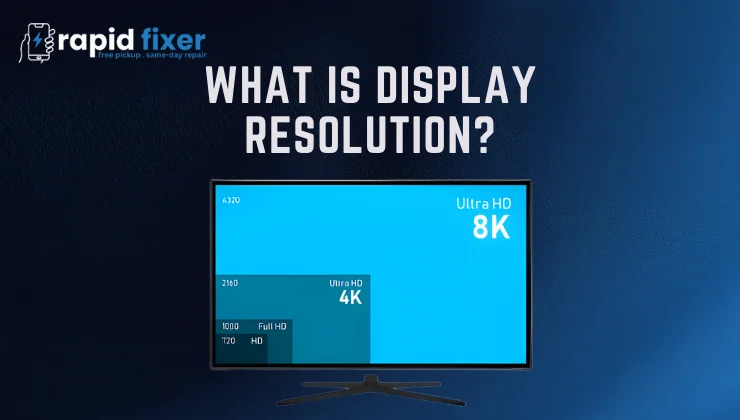
Display resolution is calculated by counting the pixels of horizontal line and vertical line. Common examples include 1280 × 720, 1920 × 1080, and 3840 × 2160. These figures indicate the number of total pixels used in the image.
The other significant aspect of the resolution is the pixel density, which is commonly expressed as pixels per inch (PPI). The resolution of two screens can be the same, but when one of the screens is physically smaller, then the pixels are more tightly packed and the image has a sharper look. This is the reason why a phone with Full HD resolution will have a better clarity compared to a big television with Full HD when held at a closer distance.
What Is HD Display Resolution?
HD is the abbreviation of High Definition and typically represents a resolution of 1280 x 720 pixels, or 720p. When individuals inquire about HD display resolution, they mean a screen display capable of displaying 720 lines of vertical detail in high definition. HD represented a significant advancement of older standard-definition displays and continues to be used in entry-level devices, small screens, and inexpensive televisions.
Full HD and Its Importance
Full HD is also known as 1080p, with a resolution of 1920 X 1080 pixels. It is one of the most prevalent display standards today. It offers significantly clearer images than HD and is popular on laptops, desktop screens, smartphones, and streaming sites. In the vast majority of daily activities, Full HD provides a decent compromise between quality and efficiency.
What Is 4K Display Resolution?
When individuals query as to what is 4K display resolution, they are referring to a screen with around 3840 pixels x 2160 pixels. It is four times the number of pixels that a Full HD display has. The outcome is very fine detail, images appear to be very sharp, particularly on large screens.
Modern televisions, high-level monitors, video editing, and gaming are known to be popular with 4K. It enables the viewers to observe greater texture, more accurate edges, and more visual content than lower resolutions.
What Is My Display Resolution?
A lot of users would like to know their current screen resolution. Such data is readily available in device settings. Display settings on a computer indicate the active resolution. In phones and tablets, the resolution is typically listed in the display or screen settings. Understanding your resolution allows you to select the correct video quality, wallpapers, and software settings so that you can have the best visual experience.
Why Display Resolution Matters
Display resolution has a direct bearing on the comfort and pleasure of your screen. Increasing the resolution enhances the readability of a text, sharpness of a picture or clarity of a video. It is particularly significant in tasks such as photo editing, video production, gaming, and web design, where specificity and accuracy are essential.
Nonetheless, higher resolutions also demand more processing power and may demand more battery on portable devices. That is why the selection of the appropriate resolution is based on screen size, usage, and hardware ability.
Display Resolution vs Screen Size
Having a bigger screen does not necessarily imply a sharper image. The size of the resolution and the screen size are in collaboration. A high-resolution small screen can appear very crisp since pixels are closely spaced, whereas a large screen with the same resolution may be less crisp since the pixels are separated. That is why the pixel density is equally important as overall resolution.
Conclusion
You can now understand clearly what display resolution is and why it is such a significant factor in any screen. It does not matter what you are researching what is resolution in display, what is my display resolution, or what is HD display resolution vs what is 4K display resolution, the main principle is the same: resolution is how much detail can be displayed on your screen.
The more the resolution the more pixels your screen, and everything looks sharper and more detailed. The correct resolution choice is based on your device, your screen size and usage but this knowledge enables you to make wiser choices and experience a better screen image.
FAQs About What Is Display Resolution?
What is display resolution in simple words?
Display resolution refers to the number of tiny dots (pixels) that compose an image on your screen. The larger the screen, the more pixels and the better the picture appears.
What is the difference between screen size and display resolution?
The physical size of a display, 15 inches or 55 inches, is called the screen size. The number of pixels on such a screen is the display resolution. A big screen with a low resolution will appear blurry and a small screen with a high resolution will appear crisp.
What is the standard display resolution today?
Full HD (1920 × 1080) is the most prevalent standard today. It is common on laptops, monitors and TVs and is quite balanced in terms of quality and performance.
What is the best resolution for everyday use?
Normal activities such as browsing, watching video, and office should be well served with Full HD. 4K offers a lot more detail when it comes to professional editing or watching on a large scale.
Does higher resolution always mean better quality?
Not always. On extremely small screens, it might not be obvious that the difference between Full HD and 4K exists. It is also more demanding in terms of both power and hardware to be run at higher resolution.